Immich and NAS Photo Frame for iPad and Apple TV
A self-hosted photo frame for iPad, iPhone, Mac and Apple TV: show photos from Immich, Synology, QNAP, Nextcloud or any WebDAV server.

October 4, 2026 by Manuel Escrig · 4 min read
Updated October 2026
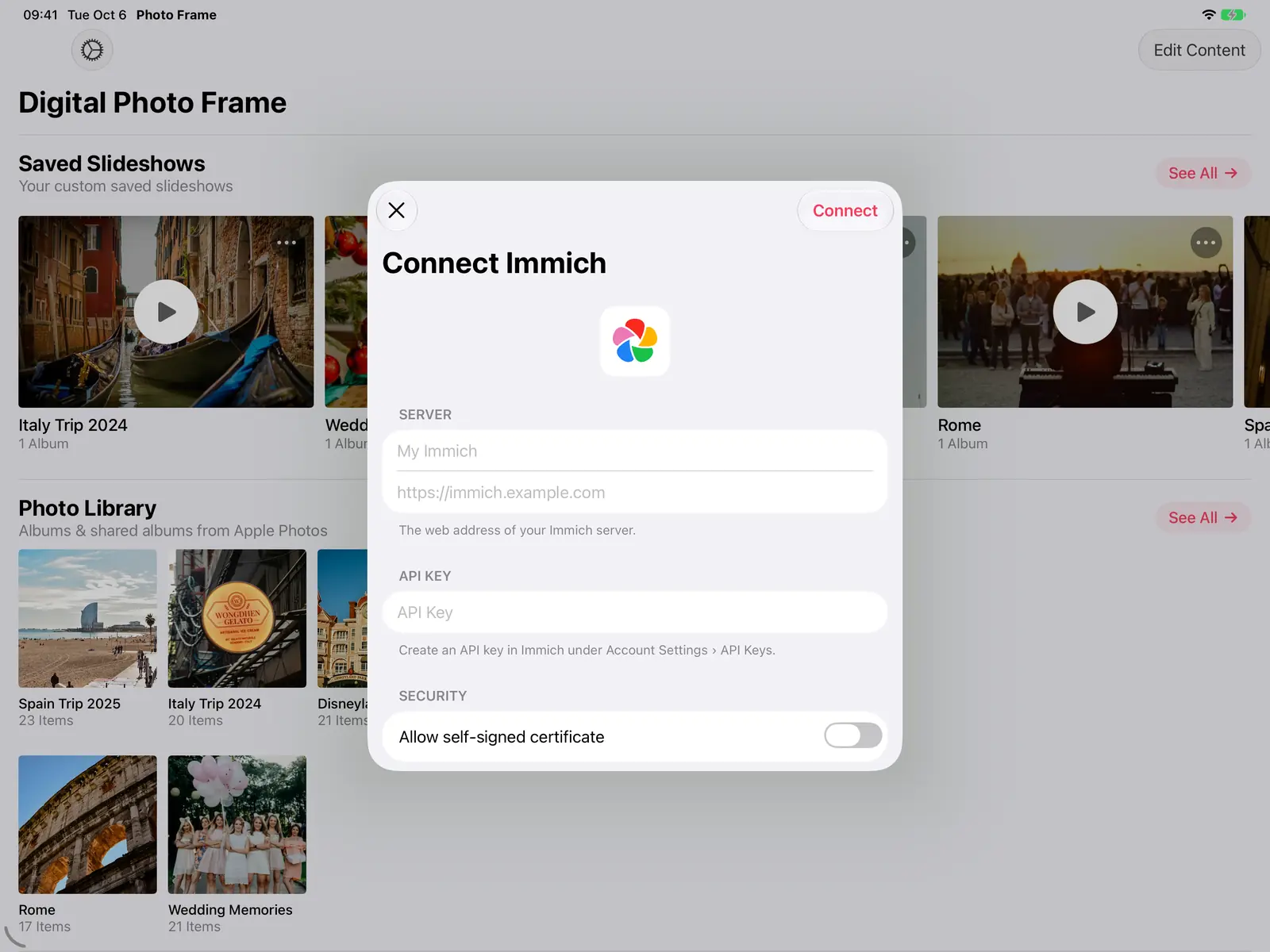
If you keep your photos on your own server, you've probably noticed that most photo frames only work with their maker's cloud. Digital Photo Frame App connects straight to Immich and to NAS / WebDAV servers such as Synology, QNAP and Nextcloud, and shows your photos and videos on iPad, iPhone, Mac and Apple TV. Nothing is uploaded to anyone else's cloud: the app talks to your server directly, which makes it a truly self-hosted photo frame.
- Connect Immich with your server address and an API key, or a NAS / WebDAV server (Synology, QNAP, Nextcloud) with your login.
- Show your whole Immich library, photos not in an album, any album or any NAS folder.
- Works on iPad, iPhone, Mac and Apple TV. Nothing goes through anyone else's cloud.
- On iPad, iPhone and Mac you choose Download to Device (works offline) or Stream from Server.
I make Digital Photo Frame App, and much of its Immich and NAS support came from people running their own servers who wrote in with suggestions and bug reports. Here is what works today and how to set it up.
What works
| Immich | NAS / WebDAV | |
|---|---|---|
| Connect with | Server address + API key | Server address + username and password |
| What you can add | All Photos, photos not in an album, any album (including albums shared with you) | Any folder, including its subfolders |
| New photos | Refresh an album from its ⋯ menu | Refresh a folder from its ⋯ menu |
| Photo details | Date, place, camera and lens, with a link back to Immich | Date, place, camera and lens |
| iPad, iPhone, Mac | Download for offline use, or stream | Download for offline use, or stream |
| Apple TV | Streams from your server | Streams from your server |
| Videos | Yes | Yes, including .mkv, .avi and .mpeg |
Connect Immich
- In Immich, create an API key under Account Settings › API Keys.
- In the app, open Add Source and tap Connect next to Immich.
- Enter your server's address and the API key. If your server uses a self-signed certificate, turn on Allow self-signed certificate.
- Choose what to show: All Photos, Not in an Album for photos you haven't organised yet, or individual albums, including albums other people shared with you. Archived photos stay hidden.
You can add more albums later without entering the server details again, and remove a single album without disconnecting the server. Removing a source from the app never deletes anything on your server.
Connect a NAS or WebDAV server
- Turn on WebDAV on your server. On a Synology NAS, for example, that's the WebDAV Server package; Nextcloud shows its WebDAV address in the Files settings.
- In the app, open Add Source and tap Connect next to NAS / WebDAV.
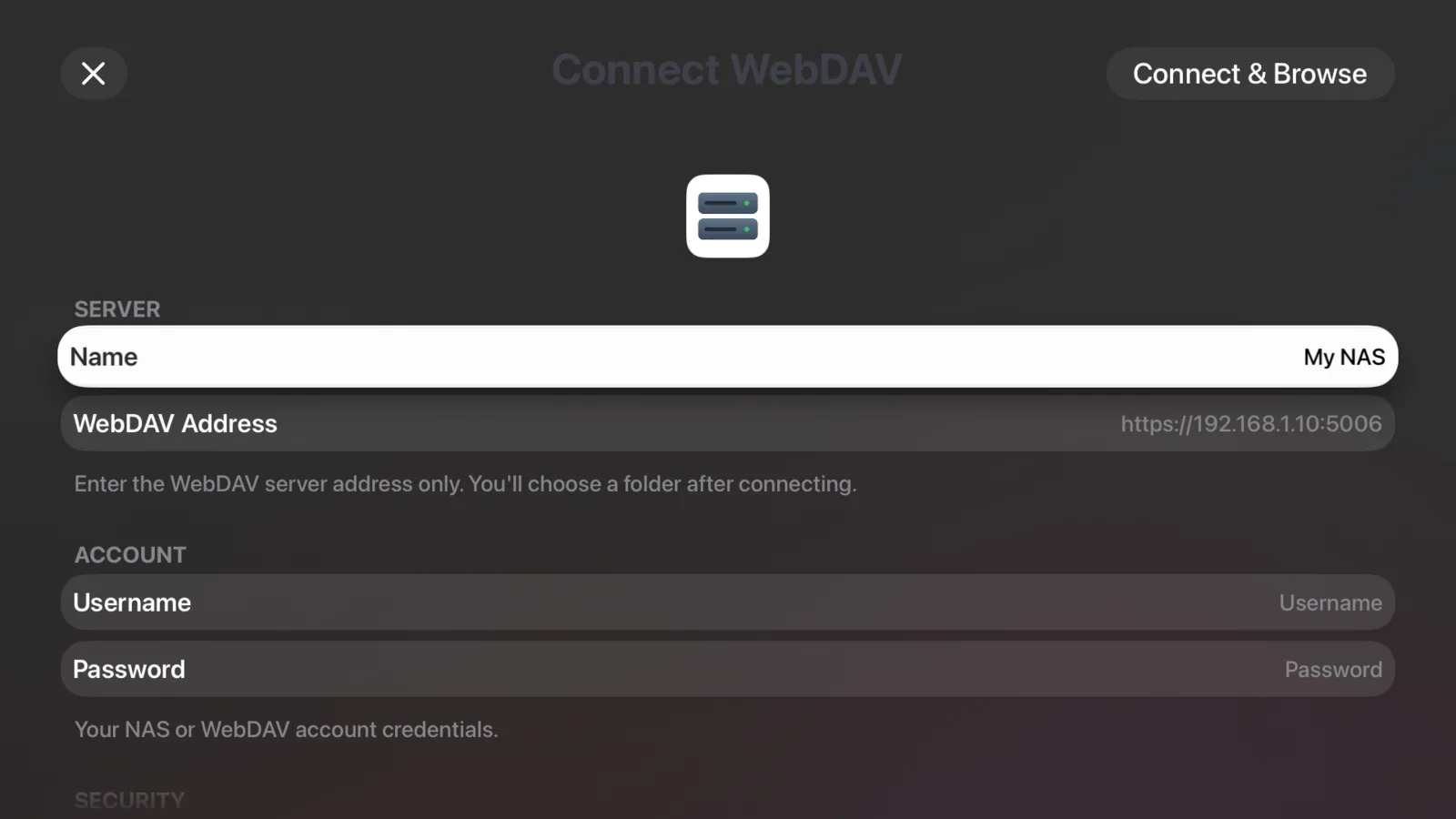
- Enter the server address only, plus your username and password, and tap Connect & Browse.
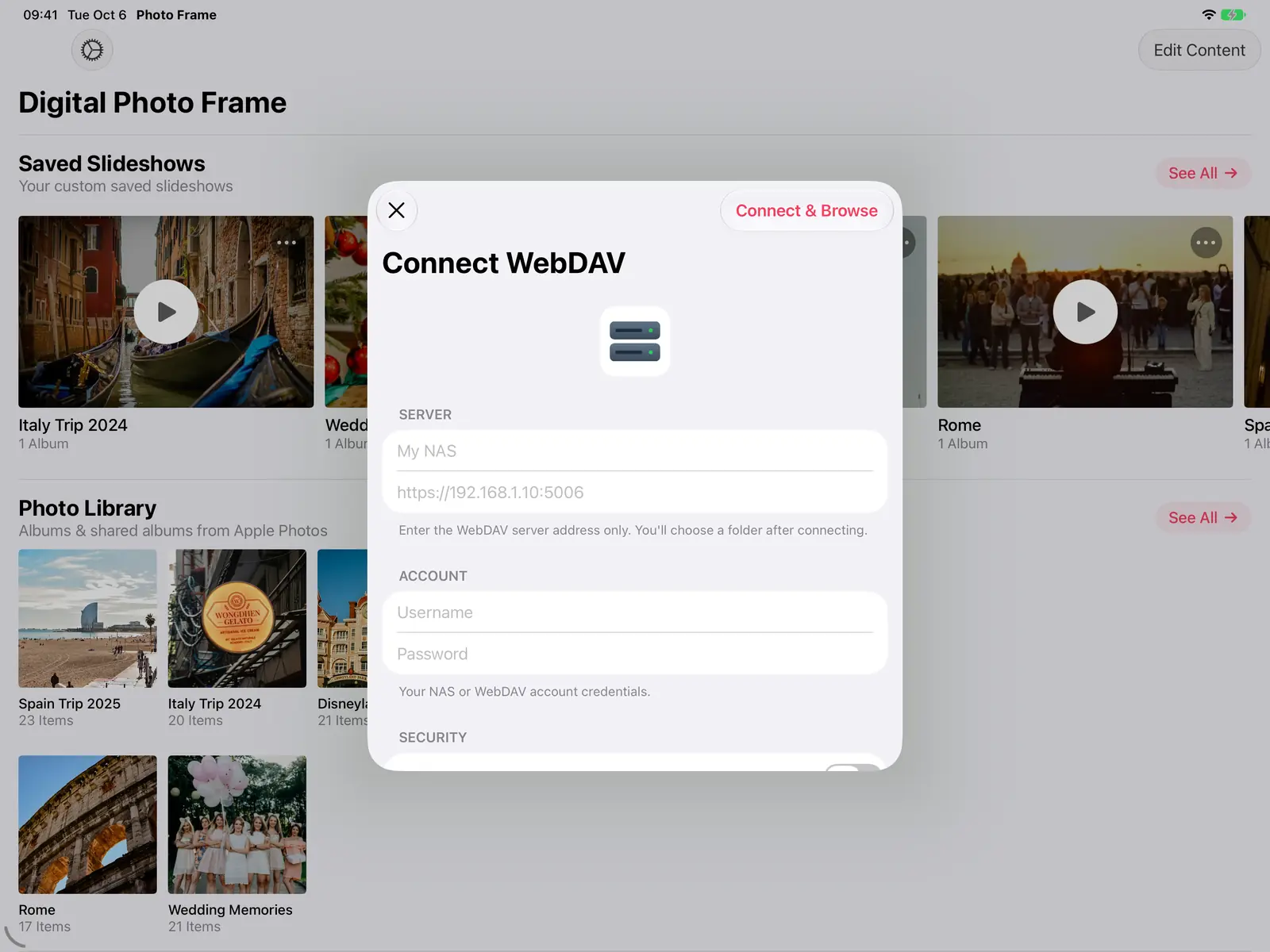
4. Browse to the folder you want, stepping into folders or back up, and tap Add Folder. Photos and videos in subfolders are included.
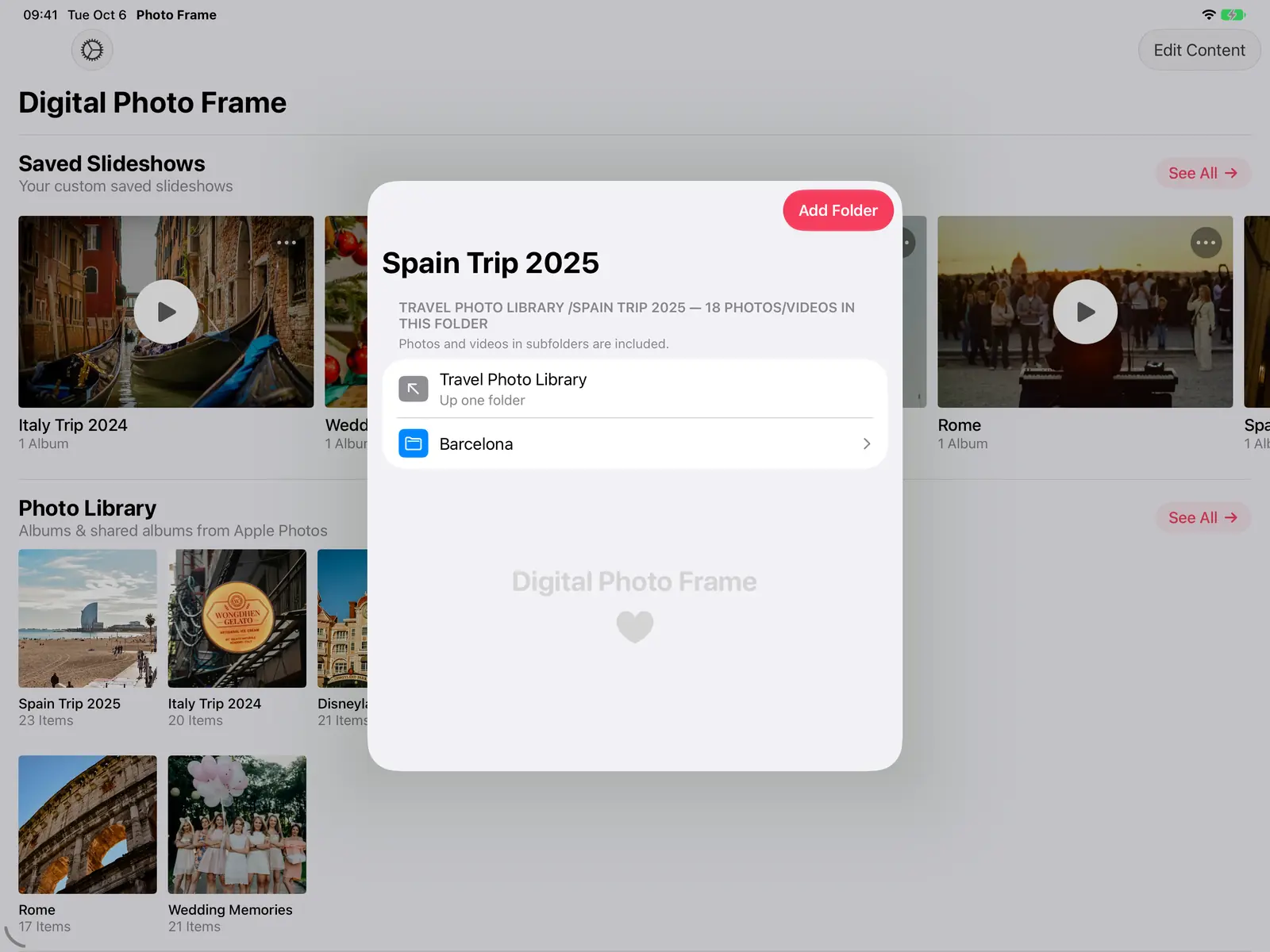
Servers on your home network can connect over plain http://. System files a NAS creates (like .DS_Store and @eaDir folders) are skipped automatically.
Download or stream
On iPhone, iPad and Mac, the app asks how to add server photos:
- Download to Device keeps them playable offline. They keep playing even if the server is switched off.
- Stream from Server saves storage by fetching photos while the slideshow plays.
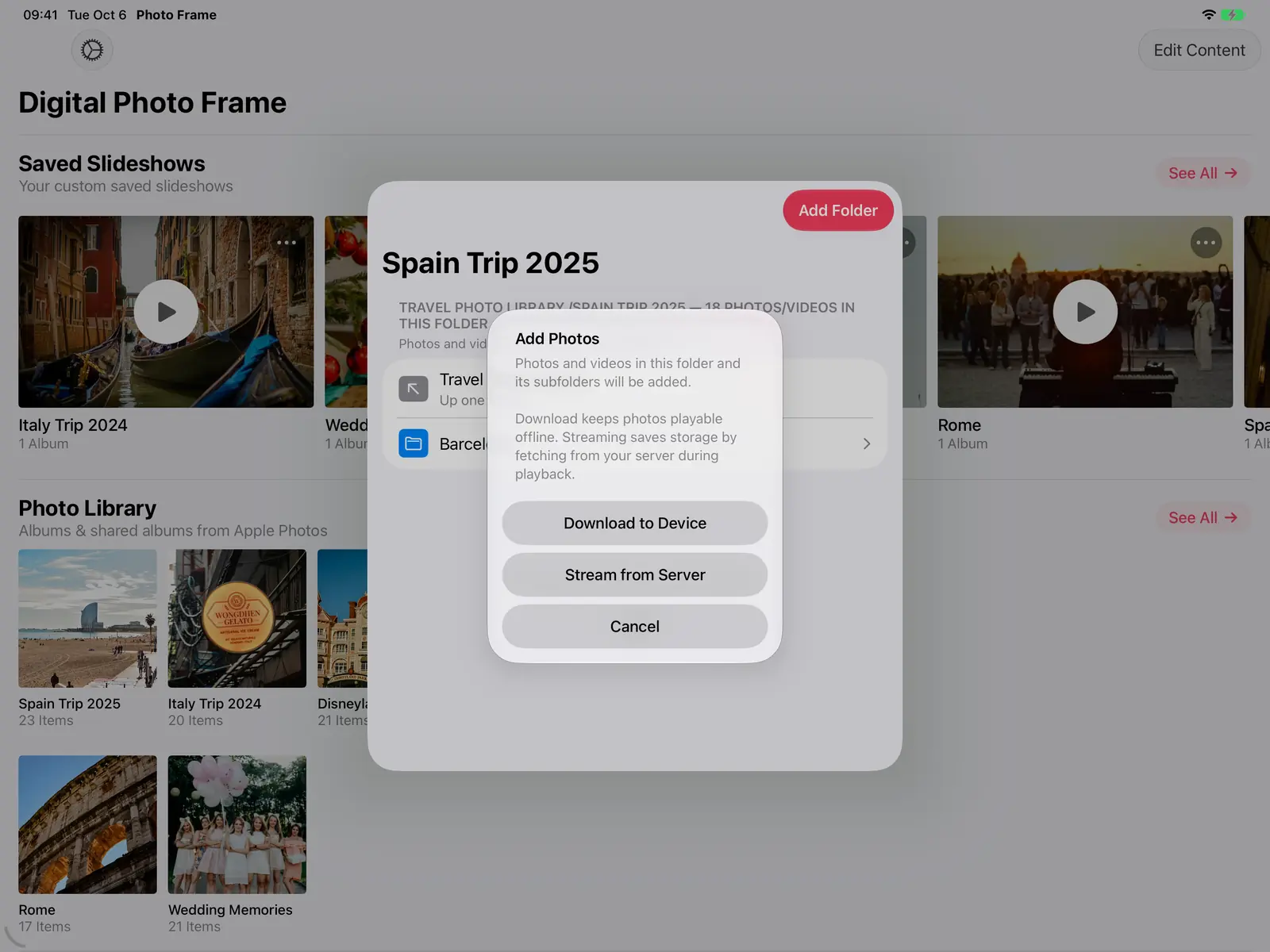
On Apple TV, photos always stream from your server, so nothing fills up the TV.
On Apple TV
Immich and NAS / WebDAV both work in the Apple TV app, set up right on the TV with a keyboard made for the Siri Remote. It turns the biggest screen in the house into a frame for your self-hosted library. See Apple TV photo frame.
Make it a frame
Everything else works the same as with any other source: transitions, music, on-screen weather and time, Adaptive Fill for mixed portrait and landscape photos, Combine Photos (Collage) for two portrait photos side by side, schedules and auto-play. The step-by-step setup for a frame is in how to turn your iPad into a digital photo frame.
Frequently asked questions
Can I show my whole Immich library?
Yes. Choose All Photos when you add Immich, or Not in an Album for photos you haven't sorted yet. Archived photos stay hidden.
Does it work with Immich 3.0?
Yes. The app works with current Immich versions, including 3.0 and later.
Are my photos uploaded anywhere?
No. The app connects to your server directly. Downloaded photos are stored on your device, and disconnecting a server removes its downloaded files and saved login.
Can I use my NAS outside my home network?
If your server is reachable from outside (for example through a domain with HTTPS or a VPN), the app connects the same way. Over the internet, use https://.
Which NAS brands work?
Any server that offers WebDAV, including Synology, QNAP and Nextcloud.
 Share on Facebook
 Share on X
Keep reading
All posts → News More Immich Photos, Less Server Setup
Choose all your Immich photos, add several albums or WebDAV folders, and remove a source without deleting the originals.
News More Immich Photos, Less Server Setup
Choose all your Immich photos, add several albums or WebDAV folders, and remove a source without deleting the originals.
 Guides Large Digital Photo Frame: Should You Use an iPad or TV?
Want a large digital photo frame? Compare an iPad, a TV with Apple TV, and a dedicated frame by screen size, placement,…
Guides Large Digital Photo Frame: Should You Use an iPad or TV?
Want a large digital photo frame? Compare an iPad, a TV with Apple TV, and a dedicated frame by screen size, placement,…
 Guides 5 Clever Ways to Reuse an Old iPad
Five useful ways to reuse an old iPad: a digital photo frame, a kitchen recipe screen, a camera monitor, a reading devi…
Guides 5 Clever Ways to Reuse an Old iPad
Five useful ways to reuse an old iPad: a digital photo frame, a kitchen recipe screen, a camera monitor, a reading devi…
 Download Now
